Backlight
Backlight is a shading feature that is used to express lighting from behind a character or model, which can look similar to how Japanese-style illustrations are drawn.
While it may seem similar to some form of Rim Lighting, it's instead rendered quite differently. Lights can receive shadows and follow the light source, which can be effective when the light hits from behind.
This feature is based off of LilToon's Backlighting feature.
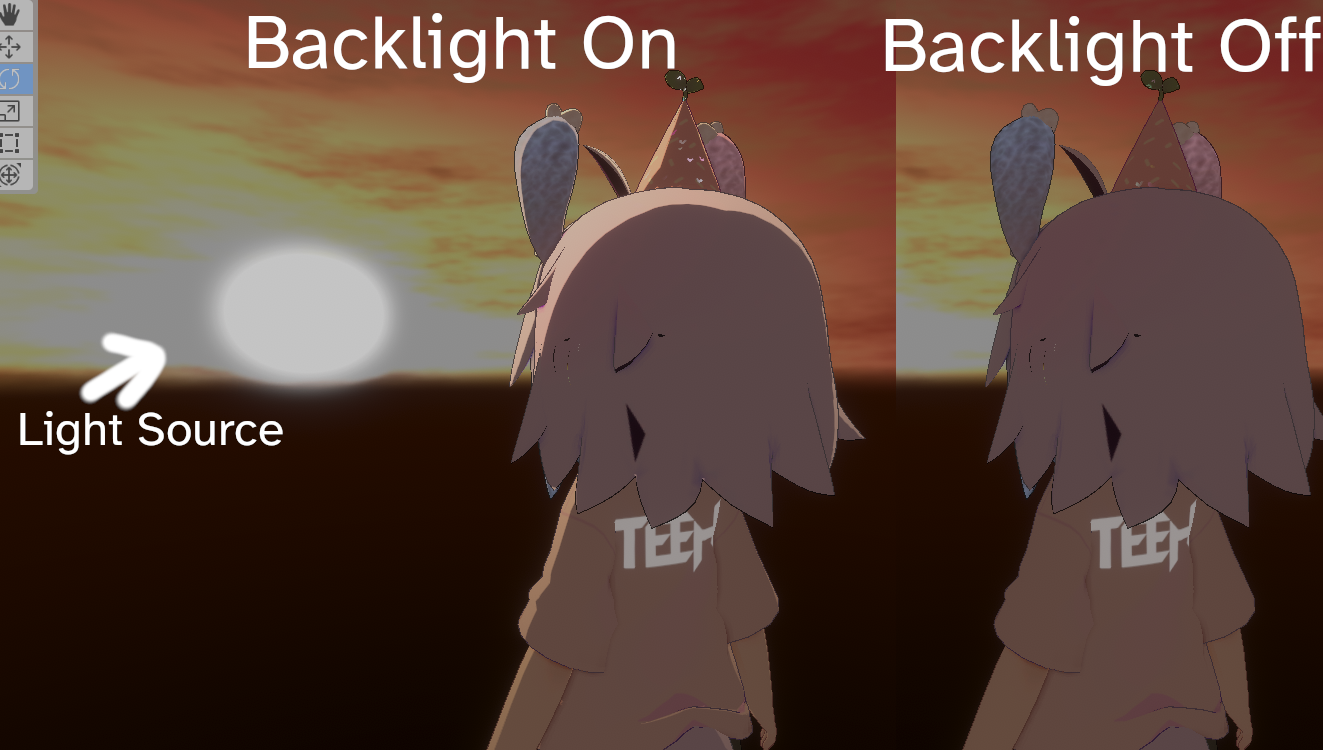
Example of the Backlighting Effect on Teeh's Avatar.
Color
- Type
- HDR Color
- Default
- #D9CCB2
Color of the light background.
Texture
- Type
- Texture Slot
- Accepts
- Color texturesRGB On
Texture that can be used as the Color of the Backlight.
Main Color Power
- Type
- Range
- Range
- 0to1
How much to blend the color of the Backlight with the Base Color.
Receive Shadow
- Type
- Toggle
If enabled, receive Shadows from other objects.
Backface Mask
- Type
- Toggle
Enables/Disables the visibility of the backlight's light on the Backface.
Backlight Options
Normal Strength
- Type
- Range
- Range
- 0to1
How much to blend the lighting with the Normals on your Model or Material.
Border
- Type
- Range
- Range
- 0to1
The range of light that can be used with the Backlight.
Blur
- Type
- Range
- Range
- 0to1
The amount of blur on the Backlight.
Directivity
- Type
- Float
Determines the amount of brightness in degrees that change according to the direction of the light source.
View Direction Strength
- Type
- Range
- Range
- 0to1
The degree to which the brightness is changed according to the direction of light.
Masking
Global Mask
- Type
- Dropdown
- Options
- Off1R1G1B1A2R2G2B2A3R3G3B3A4R4G4B4A
Select which Global Mask to use as the Backlight Mask.
Apply to Global Mask
- Type
- Dropdown
- Options
- Off1R1G1B1A2R2G2B2A3R3G3B3A4R4G4B4A
Select which Global Mask to apply Backlight effects onto.