Material Blueprints
A Material Blueprint is a ScriptableObject asset that stores a recipe for generating a Material: a target shader, a rendering mode, and an ordered list of Presets to apply. Running the blueprint creates a brand new Material with all of that pre-applied without having to manually set up a material's configuration by hand.
Blueprints are driven by the Presets system. A Preset is a Material file that is composed of tagged properties used to apply it's settings onto the target material. Refer to the Documentation page for more info.
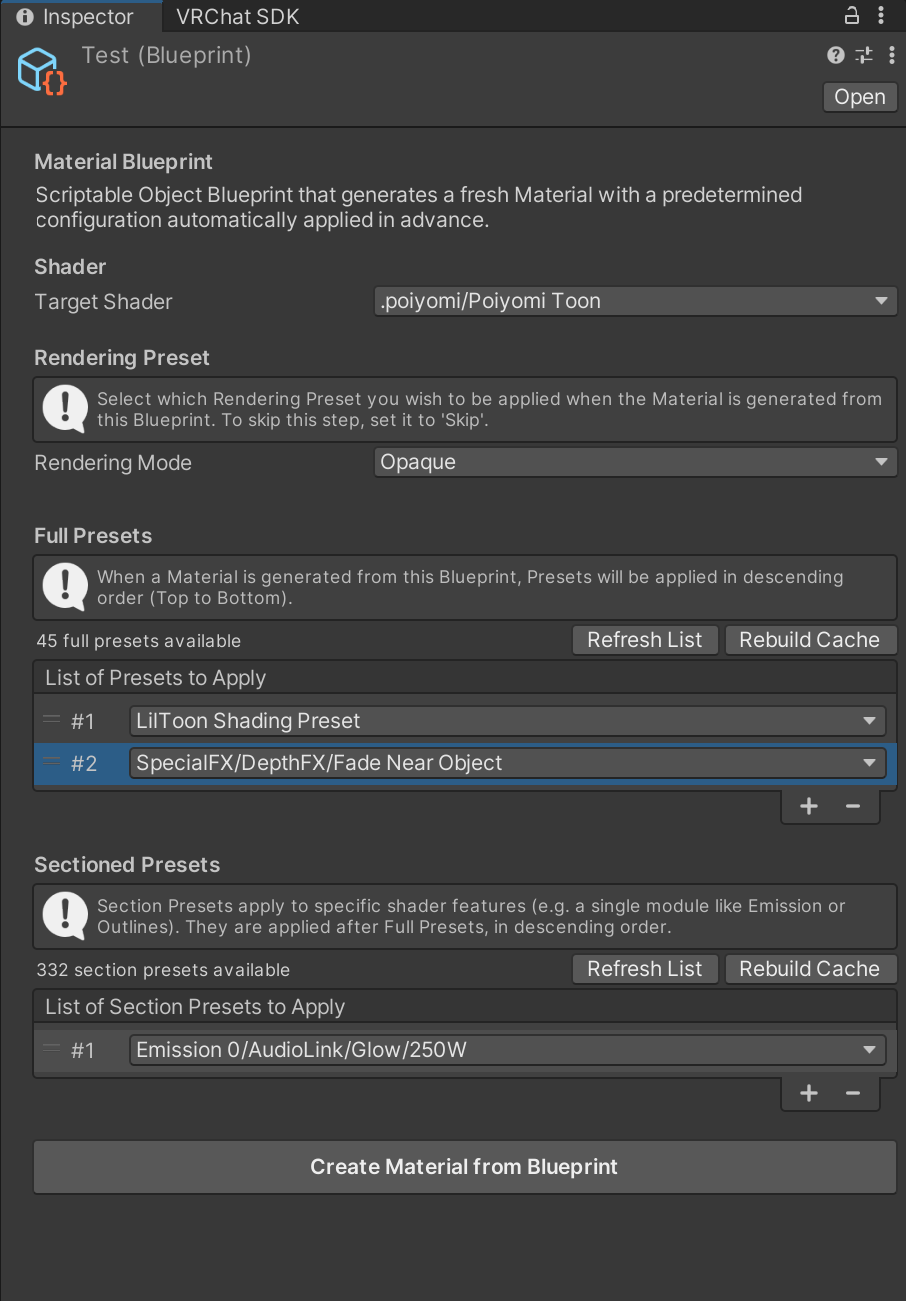
Example of a Blueprint asset
Usage
- Create a Blueprint by
Right-Click → Assets > Thry > Shaders > New Material Blueprint. This creates a Blueprint .asset file. - Select a Target Shader. Only shaders that use ThryEditor (primarily Poiyomi Shaders) are selectable, since Blueprints depend on ThryEditor's material property pipeline.
- Set a Rendering Preset to apply. "Skip" leaves it untouched.
- Add Full Presets: Build an ordered list of Presets to apply. They are applied in order from top to bottom.
- Add Section Presets: Same idea, but scoped to a specific material section. Applied after all Full Presets.
- Generate the material — click "Create Material from Blueprint" in the inspector, or right-click the blueprint asset → Assets > Thry > Shaders > Create Material from Blueprint. You'll be asked where to save the new .mat, then it's created, saved, and selected/pinged in the Project window.
The inspector shows how many Presets currently exist and flags any list entries that don't resolve.
Example
The file ThryEditor/Examples/Example Blueprint.asset provides an example of it's usage. It applies one Full Preset.
Technical Pipeline
Generation of a Material through a Blueprint follows through a defined order of operations. When a Blueprint generates a material, the following actions take place:
- Validates the Target Shader to use.
- Resolves every listed preset name.
- Creates a new Material using the Target Shader.
- Applies the Rendering Preset
_Modevalue, if set. Routed through a temporary ShaderEditor context so thaton_value_actionactually runs. - Applies each Full Preset in a listed order.
- If a preset following it targets a property that a preset in the list previously applied, it will override it. Therefore, it's important to ensure the order of operations are correct.
- Applies each Section Preset in a listed order, same as above,.
- Fixes Keywords automatically and reapplies material drawers so that the result is consistent.
- Saves the new
.matfile in the target location and refreshes the AssetDatabase.
API
Everything necessary to drive Blueprint creation from other Editor tooling is public and static.
namespace Thry.ThryEditor
{
    public class Blueprint : ScriptableObject
    {
        public Shader TargetShader;
        public float RenderingPresetValue;          // -1 = skip
        public List<string> PresetNames;             // Full Presets, in apply order
        public List<string> SectionPresetEntries;     // "collectionKey/presetName" entries, in apply order

        // Parses a SectionPresetEntries entry into its collection key and preset name.
        public static bool TryParseSectionEntry(string entry, out string collectionKey, out string presetName);

        // Generates and saves the material at savePath. Returns the saved path, or null on failure.
        public string CreateMaterial(string savePath);

        // Prompts for a save location (if savePath is omitted) and creates the material,
        // selecting/pinging it. Returns the created Material, or null.
        public static Material CreateMaterialFromBlueprintAsset(Blueprint blueprint, string savePath = null);
    }
}
A typical usage of generating a Material through the Blueprint can be done here, as an example:
Blueprint bp = AssetDatabase.LoadAssetAtPath<Blueprint>("Assets/Blueprints/My Blueprint.asset");
Material result = Blueprint.CreateMaterialFromBlueprintAsset(bp, "Assets/Generated/NewMat.mat");
Because PresetNames and SectionPresetEntries are just strings, a Blueprint can also be built or edited entirely in code without touching the Inspector.
Related APIs this system relies on:
using Thry.ThryEditor;

// Getting Presets
Presets.GetFullPresetNames();
Presets.GetFullPresetGuid(name);

// Getting Section Collection Keys
Presets.GetSectionCollectionKeys();
Presets.GetSectionPresetNames(key);
Presets.GetSectionPresetGuid(key, name);

// Getting a Material marked as a Preset
Presets.GetPresetMaterial(guid);

// Force a rebuild of the Presets Cache
Presets.RebuildCache()

// Applying a Rendering Preset outside the normal Inspector GUI while running the shader's on_value_action side effects.
ShaderEditor.ApplyRenderingPresetToMaterial(Material material, float modeValue);
Limitations
- Only shaders using ThryEditor's material property system are selectable as a Target Shader.
- Presets are referenced by name, resolved through the Presets cache at generation time. Renaming or deleting a Preset material breaks any Blueprint pointing at it.